Friday, 9 October 2015

Interactive Prototype II: Testing Data

Here is the raw data from the testing sessions that were run for the Interactive Prototype 2 of Meow Meow Cat.  The data forms two parts, the observations recorded during the session and the questionnaire users filled out.

Testing session: 6 & 7 October (week 10 workshop B & outside-class session)

Users:
  • 4 total
  • 2 male, 2 female
  • 2 not from class

Observations

User #1 (not from class)
  • played 4 games (2 square, 2 row)
  • startled by 'wrong button' noice
  • puffed, said "this is hard work"
  • used one leg more and pivoted to make it easier
  • "like a dancing game but not dancing"
  • square: "looks better"
  • times (seconds): 
    • 33, 25(final) - row
    • 25, 21 - square
User #2 (not from class)
  • played 7 games (4 square, 3 row)
  • changed feet a lot 
  • seemed to enjoy it
  • wanted to keep playing to get a better score
  • stopped playing when he reached a point where he didn't think he could get a better score
  • times (seconds): 
    • 27, 18, 11(final) - row
    • 19, 18, 15, 13 - square
User #3
  • played 4 games (2 square, 2 row)
  • initally sat down which made it hard to press foot pads
  • used one leg more
  • one go was really buggy (40 seconds), sometimes the buttons wouldn't fire
  • "my calves burned"
  • "best time yet" on final run (22 seconds)
  • competed with himself
  • times (seconds): 
    • 37, 22 - row
    • 40, 22(final) - square
User #4
  • played 4 games (2 square, 2 row)
  • found it enjoyable but wasn't super competitive
  • times (seconds): 
    • 22, 23 - row
    • 23, 23 - square

Observation overview

  • Purple dot foot pad was very buggy during class testing session but had worked fine 2 days earlier in aanother session.  I could get it to work for one uesr in class but 2 other users (not recorded above) were unable to finish a game because of this.  I don't know if it was the angle in which it was pressed or the force but it was unsuccessful.  I had my final user successfully play 4 games in the session after this happend.
  • Game played 19 times
  • Times:
    • Lowest time: 11 seconds
    • Longest time: 40 seconds
    • Average time: 23 seconds
  • Start/Stop/Reset button a little buggy - had to press in correct order to work
  • All users who played multiple games improved on their previous time

Questionnaire results

Total responses: 4
All questions except the last open 'Any comments?' question was compulsory.

Q1. Which layout did you prefer playing, formation A (straight line) or formation B (square)? Rate your preference on the following 4-point scale. 
Scale '1: Formation A' (row) to '4: Formation B' (square)

2 user: 3/4 on scale (mostly Formation B)
2 users: 4/4 on scale (definitely Formation B)

Q2. Why did you prefer one layout over the other?

  • The dots were closer together and made it easier to reach each one faster.
  • formation B felt like I was more in the game. It was also a bit easier to hit the different colours when they were separated.
  • The layout felt more natural in sense that it surrounded me.
  • I'm not entirely sure.

Q3. Would you suggest a different dot layout to those presented in this session? If so, please describe. 
  • No layout B is efficient enough
  • maybe a diamond like in DDR.
  • Perhaps use walls so that a player has to use multiple limbs to interact - my legs get tired.
  • No, the second layout was fine.

Q4. How would you describe the instructions for this testing session? 
Scale '1: Clear - it was easy to understand what to do' to '5: Confusing - I did not understand what to do'

3 user: 1/5 on scale
1 users: 2/5 on scale


Q5. If you could change any element of this game, what would it be?


  • Nothing
  • the dots are hard to see when looking at the screen. But, as I became more familiar with the game it was easier to remember where each colour was.
  • Maybe a count down timer to cue the player when to start.
  • I'm not sure. I really like that the cat is on the dot this time. It is an improvement from the last prototype. You could maybe deduct from score (which could be based on how long it takes you) if people first tap the incorrect button (before correct themselves).

Q6. Any other comments?
  • Nice cat.
  • Great game! I really liked it!

Questionnaire overview

  • Users definetley preferred the square formation over the row formation
  • cat on the dot improved understanding of game play
  • well liked
  • clear instructions

Monday, 5 October 2015

Week 10: Makey Makey & Prototype construction

The Meow Meow Cat Makey Makey prototype is mostly complete and is finally functional (just a little more gluing to do!).

Process and problems

The initial concept was for foot controls but I couldn't work out how to make the controls conductive without either operating it barefoot or adding conductive material to each user's shoes (neither ideal).  I was thinking about how to change it to hand controls, make it boppy or something which was a bit disappointing.  I had a chat to Peter (tutor) and he suggested making each foot control out of two dots with a spring (sponge) in between them, one that would be grounded, one connected to the control.  This would remove the need for the user to be connected/grounded to the Makey Makey.  When the user steps on the dot, the two circles connect and complete the circuit.

To help with planning out the prototype, I did a quick sketch of how I wanted to connect the components/wires.


Construction

To make the dots, I printed the colours on adhesive paper and stuck them to thick card.  I cut out the coloured circle and a duplicate of the same size.  To make them conductive, I cut out a smaller circle of alfoil to stick on each circle.  I then cut out sections of sponges to glue around the edges of the circle to make them springy (being careful not to touch the sponge to the alfoil).

I was worried that if the sponge wasn't high enough that the two circles might accidentally touch so chose a dense and high sponge. This proved to be a problem as it made it too hard to make the circles touch on step.

Sponges too high

Next I constructed the bottom layer of circles and connected them to a strip of copper tape connected to a grounding wire.  I had thought about grounding them seperately but it made sense to join them into one.

Four bottom circles connected to grounding wire


As I constructed each step, I used the keyboard input checker at http://www.keyboardtester.com/tester.html to test that set-up was working.

Next I connected the tops by using connective tape to attach the open end to the alfoil and non-conductive tape to hold it down at the edge.

Top and bottom circles connected.
I then sandwiched the top and bottom dots and tested the prototype with the game.  I had a small problem where sometimes multiple controls would fire because the wire ends attached to the Makey Makey were touching each other.  This was fixed with a small amount of electrical tape to seal off the ends.


Now that I know the prototype works, I will finish gluing it together ahead of next week's testing session.

Friday, 2 October 2015

Week 9: Concept/feature development

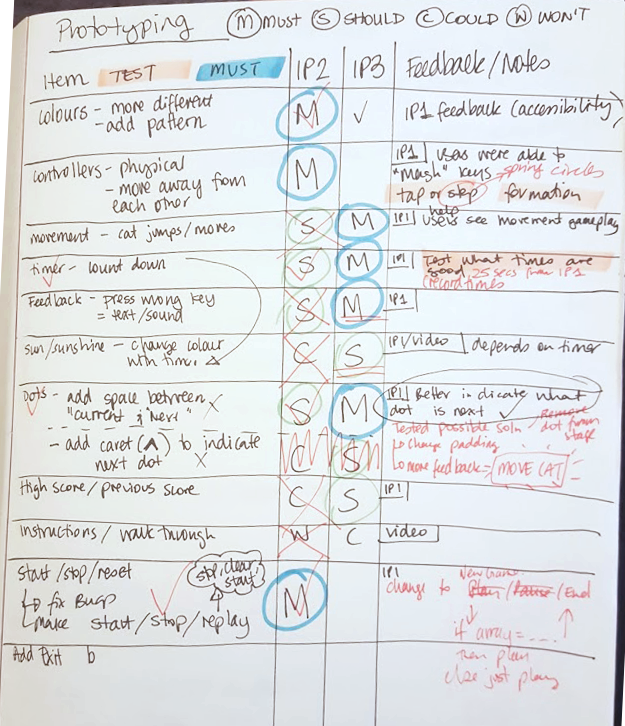
To help look at what I need to change and when (IP2/IP3 or other), I wrote up a list of features assigning Must/Should/Could/Won't.  This helped me work through features in order of priority, starting with Musts for IP2 and going from there.  It also showed where I had questions about features which led to what I wanted to test next (i.e. what question did I want my next prototype to answer)

Week 9: Interactive Prototype 2 - MakeyMakey

What is the key function or interaction for your concept?

The user moves the character (Meow Meow Cat) forward through a series of coloured dots.  Users are timed and are given auditory feedback for correct or incorrect moves.

How does it work?

The user taps corresponding coloured dots on the floor with their feet to those displayed on screen.   A Makey Makey is used to connect the dots on the floor with the computer.  A timer will be used to test how long it takes users to complete a basic level (25 dots).

What do you want to know about your prototype?

  • What formation of dots is both challenging (users need to use both feet, can't press multiple dots at once) and fun (is not so hard that user gives up early on or does not want to play)
  • How long it takes a user to complete a basic level (25 dots) and how that time improves over multiple goes.

How do you want IP2 to work?

  1. A testing computer is set-up connected to large dots on the floor through a Makey Makey device.
    1. Two cardboards circles (for each of the four dots) lined with alfoil are connected through a ring of sponges that make a spring.  When the circle is stepped on, the sponges compress connecting the two circles and the alfoil.
    2. A wire is run from the bottom circle of each of the four dots to a strip of copper (connecting all the bottom circles) and then to the grounding wire attached to the Makey Makey.
    3. Separate wires are run from the top circle of each dot to a control on the Makey Makey.  Each four colours corresponds to an arrow key.
  2. Dots are set-up in a set formation (two different formations will be tested)
  3. User stands in front of the dots ready to begin and is given verbal instruction:
    1. There are coloured dots on the floor in front of you
    2. Tap the corresponding colour dot on the floor to the screen to move your character forward
    3. Level ends when you reach the end of the row of dots
  4. There is a start button that the tester will click to begin game
  5. Game can end by either reaching the end of the row of dots or by pressing the 'end game' button.
  6. Screen includes character on far left-hand side, a row of coloured dots (four colours with patterns), timer in top left corner, 'Begin game' and 'stop' buttons on top right hand corner.
  7. User taps coloured dots to move character forward
  8. Time how long users take to reach end of row.
  9. Users can restart and replay as many times as they like 
  10. User can stop play at any time

What is not included

  • Winning or losing (reaching end by a certain time)
  • 'Chasing the sun' part of the concept (sunshine changing colour to night time with timer)
  • More than one level (and level progression)
  • Written instructions/walk through
  • On screen record of high scores

Saturday, 19 September 2015

Interactive Prototype I: Testing

Outcomes

Users were asked to use a modified keyboard to play a basic version of the game and provide feedback.  The coloured dots on the screen corresponded to coloured dots on a keyboard (arrow keys).

Most users played the game as expected multiple times.  One user wanted to get the best time possible and tried to manipulate the keyboard in different ways to achieve this without interacting with the game in the desired way.  They tried mashing the keys and pressing random keys.  Another user  could not see the difference between the colours on screen and had to stop part way through their first go.

I measured user feedback through observation, in-person questions and an online questionnaire. The data from these measures can be found here.

The feedback I was after was about the movement of the different elements on screen (how the dots and cat moved in relation to each other) and how the timer effected gameplay.

Reflections

The interactive format for the prototype was a good way to get more detailed feedback on how the game is played.  It allowed me to see users play the game and what obstacles they came up against.  It became apparent quite quickly that the colour similarity was a problem and even stopped one user from completing a level.  Other feedback I received about the movement confirmed that it wasn't clear what moved when (and what was the next colour) but didn't provide much of a solution to this.  I then discussed this problem further with tutors.

Testing with a user who wasn't from class was really useful, I found my discussion with them quite different as they were less limited by what they knew to be possible.  It was also more validating to get feedback from someone who knew less about the concept/background to start with.  I would like to expand upon this for the next test.  The testing protocol and questionnaire worked quite well but it seem like the questionnaire might be a bit too long.

Effectiveness

The prototype worked really well and I was able to answer the specific questions I had about movement and apply the feedback about the movement.  The main problem with the prototype was that the colours I had selected were too similar which caused problems for some users.  One user was unable to complete the session at all as they could not tell the colours apart, others had some problems but could still complete the level.

Constraints

The constraint of the testing session meant that even though I knew I had a problem early on with the colours, I was unable to change it for other users.  It would have been better if I could have changed this as soon as I knew it was a problem so users could concentrate on other elements like movement.  To be able to change this on the fly would have taken time that I did not have in the session.

Implications

Changes to my concept

  • make colours more different from each other and add patterns for easier visual identification (and accessibility) 

Future prototypes

  • Interactive Prototype 2  (IP2)
    • make colours more different from each other and add patterns for easier visual identification (and accessibility)
    • move controls further away from each other
    • add audio feedback to wrong control pressed
    • change cat/dot layout to make it clearer which dot is next
    • fix bugs in start/stop/pause
  •  Future prototypes
    • on-screen feedback for wrong control pressed
    • add movement to cat
    • change timer from count up to count down
    • make background change colour with timer (sunshine to night timer)
    • make start/stop easier (enter or other control)
    • add in the extra bits (power-ups, levels, etc) (maybe IP3)
    • add high scores/previous score
    • add exit button

Future testing sessions

  • Reduce length of questionnaire

Friday, 18 September 2015

Interactive Prototype I: Testing Data

Here is the raw data from the testing sessions that were run for the Interactive Prototype I of Meow Meow Cat.  The data forms two parts, the observations recorded during the session and the questionnaire users filled out.

Testing session: 15 September (week 8 workshop A)

Users:
  • 6 total
  • 4 male, 2 female
  • 1 not from class

Observations

User #1
  • played three full games
  • played two other games with errors (game over message at wrong point, I don't think the game reset in-between)
  • wanted to be previous time when he played
  • times: 24, 15, 13 seconds
User #2
  • I reset game in between goes due to problems with previous session
  • played three games
  • found colours hard to see
  • second go, mashed controls with fist (i.e. pressing all colours at once) to get better time
  • third go randomly pressed keys to get better time
  • times: 24, 17, 6 seconds
User #3
  • played twice
  • had problems telling red and purple colours apart
  • times: 23, 19 seconds
User #4
  • played twice
  • asked "what feedback is there if you press the wrong colour?"
  • times: 24, 22 seconds
User #5
  • played once
  • was unable to tell the difference between colours (blue and purple), had to guess
  • suggested adding pattern to colours to help
  • time: 31 seconds
User #6
  • played four times
  • tried to beat score, stopped playing when couldn't beat score (i.e. when there was no more challenge)
  • commented that it was fun to play
  • times: 17, 13, 9, 9

Observation overview

  • Limitations of prototype included the modified keyboard; user had to re-learn keyboard input
  • Survey took a long time, possibly too many questions
  • Game played 15 times
  • Playing as intended:
    • Lowest time: 9 seconds
    • Longest time: 24 seconds
  • Playing in other manner:
    • Lowest time: 6 seconds (by pressing random keys as quickly as possible)
    • Longest time: 31 seconds (user who had to guess colours because they were too similar to differentiate)
  • Average time:
    • 17.73 seconds (all goes)
    • 17.67 seconds (not including mashing keys, random selecting keys or guessing keys)
    • no real difference between averages
  • Problems with colours being too similar and making it hard to see
    • could change colours
    • could add pattern to colours
  • Start/Stop/Reset button a little buggy - had to press in correct order to work
  • All users who played multiple games improved on their previous time

Questionnaire results

Total responses: 6
All questions except the last open 'Any comments?' question was compulsory.

Q1. Describe what you did in this session

  • I played the game three or four times.
  • Played the game until I could not determine the difference between two of the colours. I then had to stop as I could not play the game.
  • Used the colour keys to move the cat along the path of coloured dots
  • I pressed the colours that came up on the screen.
  • Make sure the colour of each direction key, and try to remember it. play game as fast as possible.
  • Pressed the coloured dots in the correct order to advance the cat and try to beat my record time.

Q2. How would you describe the instructions for this testing session?
Scale '1: Clear - it was easy to understand what to do' to '5: Confusing - I did not understand what to do'

5 users: 1/5 on scale
1 users: 2/5 on scale

Q3. Describe the movement that happened during the game. 

  • The cat stayed still and the colours moved.
  • when I press the right key, the dot will move below the cat
  • The cat moved from left to right across the game screen and the coloured dots disappeared
  • the dots moved towards the cat/the cat moved along the dots. I'm not sure. I pressed the colour that matched the next dot on the screen.
  • the cat moved forward (right) one dot at a time
  • The colors shifted left each time I pressed them.

Q4. Apart from the cat and the dots, did you notice any other elements on the screen? 
  • I noticed the time and the buttons at top, but during gameplay I didn't pay any attention to them - just concentrated at looking at the dot keys and the dots on screen
  • not many, just the those functional buttons
  • not after I started playing.
  • There was a yellow background. There was a start, stop, reset button at the top. There was a timer up the top left of the screen.
  • The time on the top of the screen.
  • The Timer in the top left hand side of the game. The Buttons in the top right were also visible
Q5. If you noticed the timer, did it affect how you played the game?
3 options

3 users: Yes, it affected how I played
1 user: No, it did not affect how I played
2 users: No, I did not notice the timer

Q6. Describe how the timer affected how you played.  
  • I didn't really look at the timer during the game - only after to see if I beat my previous game's time. perhaps there could be audio reminder every 5 or ten second intervals? Might be worth trying, hopefully it wouldn't be too annoying, but will add some element of pressure!
  • I tried to beat my previous times.
  • I didn't pay attention to it until the end of the game.
  • I want to finish the game as soon as possible
  • I did not notice it. So it did not affect the way I played
  • Added stress, but also made me want to continue playing to see how fast I could complete the course
Q7. Which elements on the screen moved? 
  • the dots are moving
  • The dots moved and the timer counted.
  • the dots
  • The colours moved.
  • The colors.
  • Only the dots. It seems like the cat is moving but i am pretty sure it remains stationary
Q8. Any other comments?
  • It was sometimes a little confusing which colour needed to be pressed as. If that cat was currently on green, I wanted to press green but I actually had to press blue which was the next colour in the sequence. I was able to learn to press the correct button after a few plays but it was not immediately obvious.
  • add a key press check function, maybe, because user can press all direction, and the game will be finished very quick
  • For some reason, I kept wanting to press the color under the cat rather than the color to the right of that color. I think it would be easier to press the color under that cat because it's not between to other colors, and it's more noticeable because it's under the cat. I think if I played this game more, I would more easily press the colors instinctively rather than having to look down to see where colors were. I think this will be easier in your next prototype because you won't have the correlated instinct of up/down/left/right keys. Overall, I really liked this game! Good work!
  • The first comment is about colour. I could not tell the difference between two of the colours and as such I could not finished the game. Change the colours or add a pattern to make it easier to determine which is which. Secondly I would add a space between the colour I am on and the next colour. I was confused at times. If the colour I was on was a different size or shape I would automatically assume it was the colour I was on and look to the next number.
  • It would be good if there was a sound when you hit the wrong colour, I found it hard to know if I had pressed the wrong button, or just not pressed anything.

Questionnaire overview

  • Users understood that they were moving the cat along the coloured path even though it was the path that was actually moving
  • Users found my instructions for the testing easy to understand (Q2) but I should have reversed the scale (so 5/5 was 'completely understand' not 1/5)
  • When asked what they did, users understood the gameplay of the cat moving along the coloured path 
  • When asked to describe the movement, some (3-4/6) thought the cat moved (what I intended to be perceived), some (2-3/6) thought the dots moved (what actually happened) but when asked what element/s moved, all users reported the dots moved.
    • confusion about what moved might be clearer if the cat had movement, even if it didn't physically move across the screen e.g. 'jumped' up and down on the dots
    • users knew that the only 'moving' element was the dots but about half perceived the cat moving (what I wanted to happen).
  • Half the users (3/6) noticed the timer and used it to compete against themselves even though they were not told to, and they didn't know their times were being recorded.  One other user noticed the time but reported it did not affect how they played.
  • Players liked the pressure of the timer to compete but didn't notice during gameplay, only at end of level.
  • Give users some feedback when they press the wrong button
    • maybe sound or text/image on screen
  • Physically distance the inputs for the next prototype to make it impossible (or at least much harder) to randomly press inputs or press more than one at a time
  • Colours (accessibility) needs to be fixed
  • Game started with cat off the dots and when you pressed the first colour, dot moved underneath, then press next colour, etc. Once you had pressed a couple of colours, it was then unclear/easy to get mixed up which colour to press next.  Was it the colour under the cat of the colour next to (right of) the cat.
    • could change size of dots once they are pressed (i.e. colours under the cat and to the left of)
    • could add in a market (like a caret) underneath the dot you are to press next
    • could animate the cat so it looks more like it is jumping to the next dot
    • add more of a space between the dots I have pressed and the dots I haven't pressed yet

Tuesday, 15 September 2015

Week 8: Makey Makey I

We started using Makey Makey's this week in class.  We did a few activities to simulate different games and their controls and get us thinking about the different ways we can use them and what problems we might come across.  Our tutor mentioned at the start that one of the biggest things to remember was to ground it and I still forgot half a dozen times during the workshop.  My IP1 will plug straight into a Makey Makey because of how it was set up (using keyboard arrows).  My challenge will be to get it as physical as possible on a floor mat set-up, and hopefully to add more functionality to the prototype and fix some of the bugs from IP1.

One of the most interesting things we did was play multi-person Pacman where 4 people were each responsible for a direction.  We had to communicate a lot to make this work but it made it a lot more fun than regular Pacman.  Here are a few of the different set-ups I tried today.

Set-up for space invaders.  Alfoil bracelet grounds it.

Set-up for piano, using back letter controls (WASDFG).

Playing the online piano.

Set-up to play my game, success!